Master the AZ-104 Microsoft Azure Administrator content and be ready for exam day success quickly with this Ucertify AZ-104 test preparation. We guarantee it!We make it a reality and give you real AZ-104 questions in our Microsoft AZ-104 braindumps.Latest 100% VALID Microsoft AZ-104 Exam Questions Dumps at below page. You can use our Microsoft AZ-104 braindumps and pass your exam.
Free demo questions for Microsoft AZ-104 Exam Dumps Below:
NEW QUESTION 1 You have an Azure subscription that contains multiple virtual machines in the West US Azure region.
You need to use Traffic Analytics in Azure Network Watcher to monitor virtual machine traffic.
Which two resources should you create? Each correct answer presents part of the solution. NOTE: Each correct selection is worth one point.
- A. a Data Collection Rule (OCR) in Azure Monitor
- B. a Log Analytics workspace
- C. an Azure Monitor workbook
- D. a storage account
- E. a Microsoft Sentinel workspace
Answer: BD
Explanation:
To use Traffic Analytics in Azure Network Watcher, you need to create a Log Analytics workspace and a storage account. A Log Analytics workspace is a cloud-based repository that collects and stores data from various sources, such as NSG flow logs. A storage account is a container that provides a unique namespace to store and access your data objects in Azure Storage. You need to enable NSG flow logs and configure them to send data to both the Log Analytics workspace and the storage account. Traffic Analytics analyzes the NSG flow logs and provides insights into traffic flow in your Azure cloud. References:
✑ Traffic analytics - Azure Network Watcher | Microsoft Learn
✑ Traffic analytics FAQ - Azure Network Watcher | Microsoft Learn
NEW QUESTION 2
You create an App Service plan named plan1 and an Azure web app named webapp1. You discover that the option to create a staging slot is unavailable. You need to create a staging slot for plan1.
What should you do first?
- A. From webapp1, modify the Application settings.
- B. From webapp1, add a custom domain.
- C. From plan1, scale up the App Service plan.
- D. From plan1, scale out the App Service plan.
Answer: C
Explanation:
The app must be running in the Standard, Premium, or Isolated tier in order for you to enable multiple deployment slots. If the app isn't already in the Standard, Premium, orIsolated tier, you receive a message that indicates the supported tiers for enabling staged publishing. At this point, you have the option to select Upgrade and go to the Scale tab of your app before continuing.
Scale up: Get more CPU, memory, disk space, and extra features like dedicated virtual machines (VMs), custom domains and certificates, staging slots, autoscaling, and more.
Scale out: Increase the number of VM instances that run your app. You can scale out to as many as 30 instances
Reference:
https://docs.microsoft.com/en-us/azure/app-service/deploy-staging-slots https://docs.microsoft.com/en-us/azure/app-service/manage-scale-up
NEW QUESTION 3
Note: This question is part of a series of questions that present the same scenario. Each question in the series contains a unique solution that might meet the stated goals. Some question sets might have more than one correct solution, while others might not have a correct solution.
After you answer a question in this section, you will NOT be able to return to it. As a result, these questions will not appear in the review screen.
You have an Azure Active Directory (Azure AD) tenant named Adatum and an Azure Subscription named Subscription1. Adatum contains a group named Developers. Subscription1 contains a resource group named Dev.
You need to provide the Developers group with the ability to create Azure logic apps in the Dev resource group.
Solution: On Dev, you assign the Contributor role to the Developers group. Does this meet the goal?
- A. Yes
- B. No
Answer: A
Explanation:
The Contributor role grants the ability to create and manage all types of Azure resources, including logic apps. Assigning this role to the Developers group on the Dev resource group will allow them to create logic apps in that scope. Then, References: [Built-in roles for Azure resources] [Azure Logic Apps permissions and access control]
NEW QUESTION 4
HOTSPOT
You have an Azure subscription that contains an Azure Storage account named storage1 and the users shown in the following table.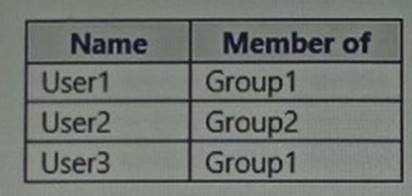 You plan to monitor storage1 and to configure email notifications for the signals shown in the following table.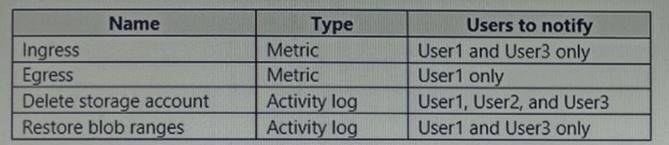
You need to identify the minimum number of alert rules and action groups required for the planned monitoring.
How many alert rules and action groups should you identify? To answer, select the appropriate options in the answer area.
NOTE: Each correct selection is worth one point.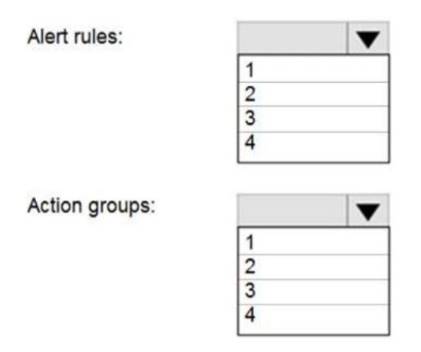
Solution:
Box 1 : 4
As there are 4 distinct set of resource types (Ingress, Egress, Delete storage account, Restore blob ranges), so you need 4 alert rules. In one alert rule you can't specify different type of resources to monitor. So you need 4 alert rules.
Box 2 : 3
There are 3 distinct set of "Users to notify" as (User 1 and User 3), (User1 only), and (User1, User2, and User3). You can't set the action group based on existing group (Group1 and Group2) as there is no specific group for User1 only. So you need to create 3 action group.
Does this meet the goal?
- A. Yes
- B. Not Mastered
Answer: A
NEW QUESTION 5
HOTSPOT
You have an Azure subscription that contains a virtual machine named VM1.
To VM1, you plan to add a 1-TB data disk that meets the following requirements:
• Provides data resiliency in the event of a datacenter outage.
• Provides the lowest latency and the highest performance.
• Ensures that no data loss occurs if a host fails.
You need to recommend which type of storage and host caching to configure for the newdata disk.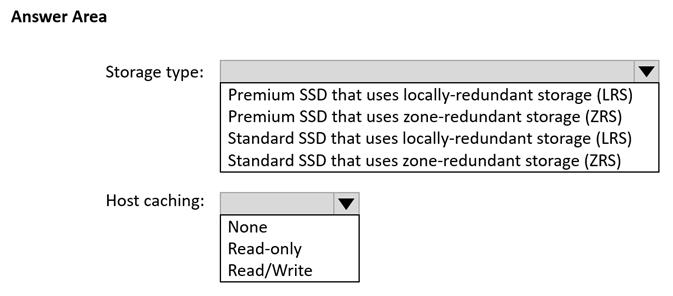
Solution:
Storage Type: Premium SSD that uses zone-redundant storage (ZRS) Host Caching: Read-only
The reasons for this recommendation are:
✑ Premium SSD disks provide the lowest latency and the highest performance among the available disk types12.
✑ Zone-redundant storage (ZRS) provides data resiliency in the event of a datacenter outage by replicating the data across three availability zones in the same region12.
✑ Read-only host caching can improve the read performance of the disk by using the VM’s RAM and local SSD as a cache13. This can also reduce the impact of a host failure on the disk data, as the cached data is not lost4.
✑ Read/write host caching is not recommended for Premium SSD disks, as it can introduce additional latency and reduce the durability guarantees of the disk13.
Does this meet the goal?
- A. Yes
- B. Not Mastered
Answer: A
NEW QUESTION 6
You are configuring Azure AD authentication for an Azure Storage account named storage1.
You need to ensure that the members of a group named Group1 can upload files by using the Azure portal. The solution must use the principle of least privilege.
Which two roles should you assign to Group1? Each correct answer presents part of the solution.
NOTE: Each correct selection is worth one point.
- A. Storage Blob Data Contributor
- B. Reader
- C. Storage Blob Data Reader
- D. Contributor
- E. Storage Account Contributor
Answer: AB
Explanation:
To ensure that the members of Group1 can upload files by using the Azure portal, they need to have both data access and management access to the storage account. Data access refers to the ability to read, write, or delete blob data in the storage account. Management access refers to the ability to view the storage account resources in the Azure portal, but not modify them. The Azure role-based access control (Azure RBAC) system provides built-in roles that encompass common sets of permissions for data access and management access. The Storage Blob Data Contributor role grants read, write, and delete access to blob data in the storage account. The Reader role grants view access to the storage account resources in the Azure portal. Therefore, by assigning both roles to Group1, the members of the group can upload files by using the Azure portal. This solution also follows the principle of least privilege, as the group members are only granted the minimum permissions required to perform the task. References:
✑ Assign an Azure role for access to blob data
✑ Data access from the Azure portal
NEW QUESTION 7
You have an Azure subscription that contains a resource group named RG26.
RG26 is sot to the West Europe location and is used to create temporary resources for a project. RG26 contains the resources shown in the following table.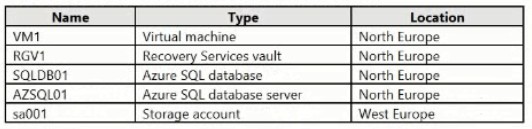
SQLD01 is backed up to RGV1.
When the project is complete, you attempt to delete RG26 from the Azure portal. The deletion fails.
You need to delete RG26. What should you do first?
- A. Stop the backup of SQLDB01.
- B. Delete sa001.
- C. Delete VM1.
- D. StopVM1.
Answer: A
Explanation:
You can't delete a vault that contains backup data. So in this case at first you have to delete the backup of 'SQLD01' before you attempt to delete the vault.Reference:
https://docs.microsoft.com/en-us/azure/backup/backup-azure-delete-vault
NEW QUESTION 8
HOTSPOT
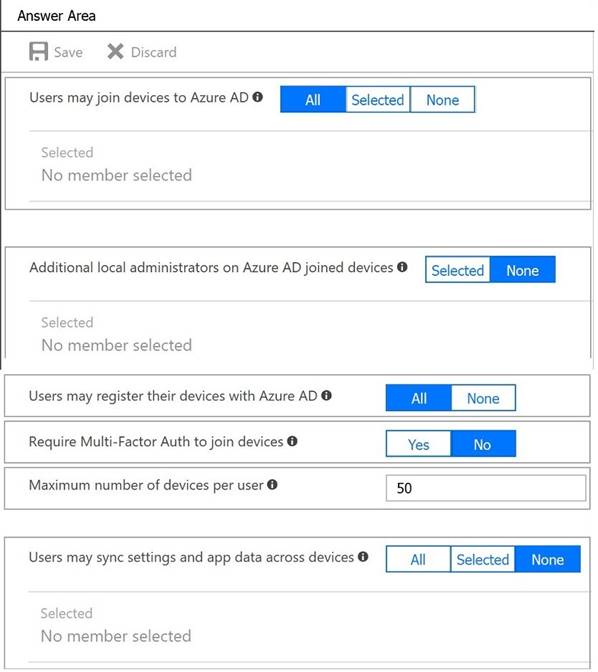
You need to configure the Device settings to meet the technical requirements and the user requirements.
Which two settings should you modify? To answer, select the appropriate settings in the answer area.
Solution:
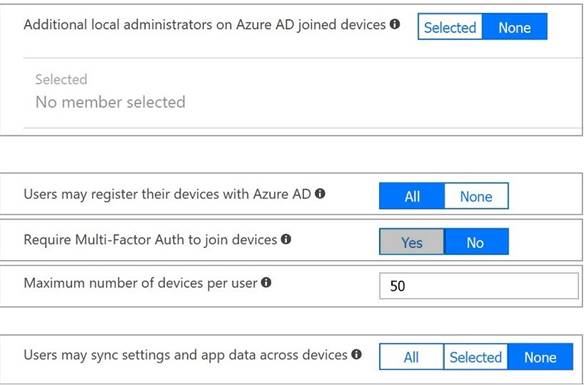
Box 1: Selected
Only selected users should be able to join devices
Box 2: Yes
Require Multi-Factor Auth to join devices.
From scenario:
✑ Ensure that only users who are part of a group named Pilot can join devices to Azure AD
✑ Ensure that when users join devices to Azure Active Directory (Azure AD), the users use a mobile phone to verify their identity.
Does this meet the goal?
- A. Yes
- B. Not Mastered
Answer: A
NEW QUESTION 9
You need to prepare the environment to meet the authentication requirements.
Which two actions should you perform? Each correct answer presents part of the solution. NOTE: Each correct selection is worth one point.
- A. Allow inbound TCP port 8080 to the domain controllers in the Miami office.
- B. Add http://autogon.microsoftazuread-sso.com to the intranet zone of each client computer in the Miami
 office.
 - C. Join the client computers in the Miami office to Azure AD.
- D. Install the Active Directory Federation Services (AD FS) role on a domain controller in the Miami office.
- E. Install Azure AD Connect on a server in the Miami office and enable Pass-through Authentication.
Answer: BE
Explanation:
B: You can gradually roll out Seamless SSO to your users. You start by adding the following Azure AD URL to all or selected users' Intranet zone settings by using Group Policy in Active Directory: https://autologon.microsoftazuread-sso.com
E: Seamless SSO works with any method of cloud authentication - Password Hash Synchronization or Pass-through Authentication, and can be enabled via Azure AD Connect.
References:
https://docs.microsoft.com/en-us/azure/active-directory/hybrid/how-to-connect-sso-quick- start
NEW QUESTION 10
You have an Azure App Service app named Appl that contains two running instances. You havean autoscale rule configured as shown in the following exhibit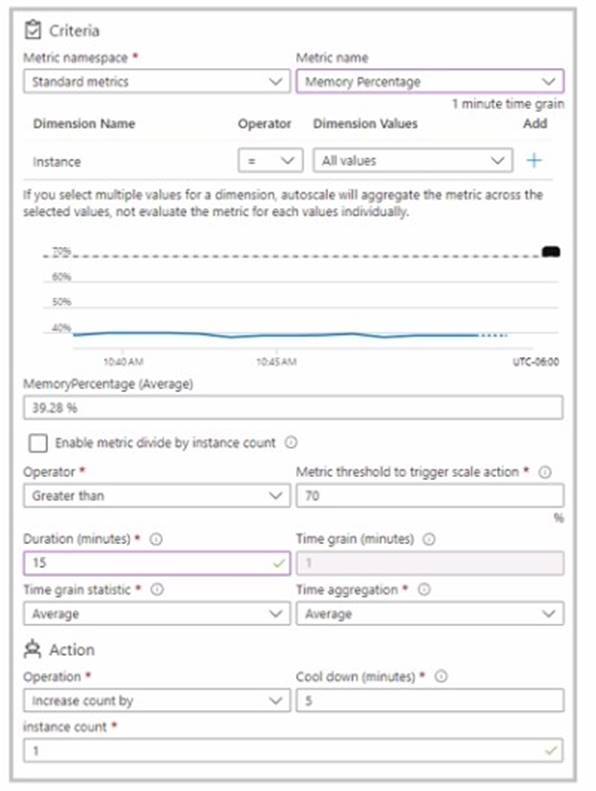
For the instance limits stale condition setting, you set Maximum to 5. During a 30-minute period. Appl uses 60 percent of the available memory.
What is the maximum number of instances tor Appl during the 30-minute pefiod:
- A. 2
- B. 3
- C. 4
- D. 5
Answer: C
Explanation:
The exhibit shows that you have an autoscale rule configured for your App Service app named App1. The rule is based on the memory percentage metric, which measures the average amount of memory used by all the instances of your app. The rule has the following settings:
✑ Scale out action: Add 1 instance when the memory percentage is greater than or
equal to 80% for a duration of 10 minutes.
✑ Scale in action: Remove 1 instance when the memory percentage is less than or equal to 60% for a duration of 10 minutes.
✑ Instance limits: The minimum number of instances is 2, and the maximum number of instances is 5.
According to the question, during a 30-minute period, App1 uses 60% of the available memory. This means that the scale in action is triggered, but not the scale out action. Therefore, one instance is removed from App1 every 10 minutes, until the minimum number of instances is reached.
Since App1 initially has two running instances, after the first 10 minutes, one instance is removed and App1 has one instance left. However, since the minimum number of instances is set to 2, another instance is added back to App1 to meet the minimum requirement. Therefore, after the first 10 minutes, App1 still has two instances.
After the second 10 minutes, the same process repeats. One instance is removed due to the scale in action, and another instance is added back due to the minimum requirement. Therefore, after the second 10 minutes, App1 still has two instances.
After the third 10 minutes, there is no change in the number of instances, because App1 already has the minimum number of instances. Therefore, after the third 10 minutes, App1 still has two instances.
Therefore, during the 30-minute period, App1 never has more than two instances running at any given time. However, since one instance is removed and added back every 10 minutes, there are four different instances that are used by App1 during the period. Hence, the maximum number of instances for App1 during the period is four.
NEW QUESTION 11
DRAG DROP
You need to prepare the environment to ensure that the web administrators can deploy the web apps as quickly as possible.
Which three actions should you perform in sequence? To answer, move the appropriate actions from the list of actions to the answer area and arrange them in the correct order.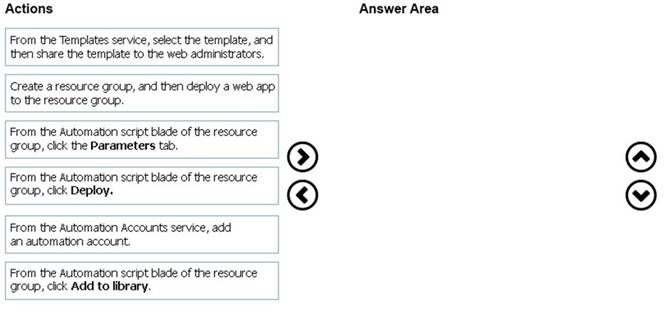
Solution:
* 1. Web administrators will deploy Azure web apps for the marketing department.
* 2. Each web app will be added to a separate resource group.
* 3. The initial configuration of the web apps will be identical.
* 4. The web administrators have permission to deploy web apps to resource groups.
Steps:
1 --> Create a resource group, and then deploy a web app to the resource group.
2 --> From the Automation script blade of the resource group , click Add to Library.
3 --> From the Templates service, select the template, and then share the template to the web administrators .
References:
https://docs.microsoft.com/en-us/azure/azure-resource-manager/templates/quickstart-create-templates-use-the-portal
Does this meet the goal?
- A. Yes
- B. Not Mastered
Answer: A
NEW QUESTION 12
You have an Azure subscription that contains a storage account named account1.
You plan to upload the disk files of a virtual machine to account! from your on-premises network. The on-premises network uses a public IP address space of 131.107.1.0/24.
You plan to use the disk files to provision an Azure virtual machine named VM1. VM1 will be attached to a virtual network named VNet1. VNet1 uses an IP address space of 192.168.0.0/24.
You need to configure account1 to meet the following requirements:
• Ensure that you can upload the disk files to account1.
• Ensure that you can attach the disks to VM1.
• Prevent all other access to account1.
Which two actions should you perform? Each correct answer presents part of the solution. NOTE: Each correct selection is worth one point.
- A. From the Networking blade of account1, select Selected networks
- B. From the Service endpoints blade of VNet1, add a service endpoint.
- C. From the Networking blade of account11, add the 131.107.1.0/24 IP address range.
- D. From the Networking blade of account1. select Allow trusted Microsoft services to access this storage account
- E. From the Networking blade of account1, add VNet1.
Answer: AE
Explanation:
To restrict access to account1, you need to enable the firewall and virtual network settings on the storage account. This allows you to specify which networks can access the storage account. By selecting Selected networks, you can block all access from the public internet and only allow access from the specified networks. By adding VNet1, you can allow access from the virtual network that contains VM1. You do not need to add the on-premises IP address range or enable the service endpoint option, as these are not required for uploading the disk files to the storage account. You do not need to allow trusted Microsoft services, as this is not relevant for the scenario. Then, References: [Configure Azure Storage firewalls and virtual networks] [Upload a generalized VHD to Azure]
NEW QUESTION 13
DRAG DROP
You have an Azure subscription that contains a virtual machine name VM1. VM1 has an operating system disk named Disk1 and a data disk named Disk2. You need to back up Disk2 by using Azure Backup.
Which three actions should you perform in sequence? To answer, move the appropriate actions from the list of actions to the answer area and arrange them in the correct order.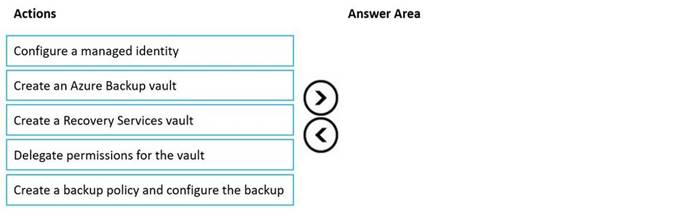
Solution:

Does this meet the goal?
- A. Yes
- B. Not Mastered
Answer: A
NEW QUESTION 14
HOTSPOT
Your network contains an on-premises Active Directory Domain Services (AD DS) domain named contoso.com. The domain contains the servers shown in the following table.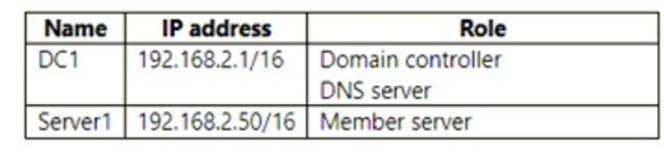
You plan to migrate contoso.com to Azure.
You create an Azure virtual network named VNET1 that has the following settings:
• Address space: 10.0.0.0/16
• Subnet:
o Name: Subnet1 o IPv4: 10.0.1.0/24
You need to move DC1 to VNET1. The solution must ensure that the member servers in contoso.com can resolve AD DS DNS names.How should you configure DC1? To answer, select the appropriate options in the answer area.
NOTE: Each correct selection is worth one point.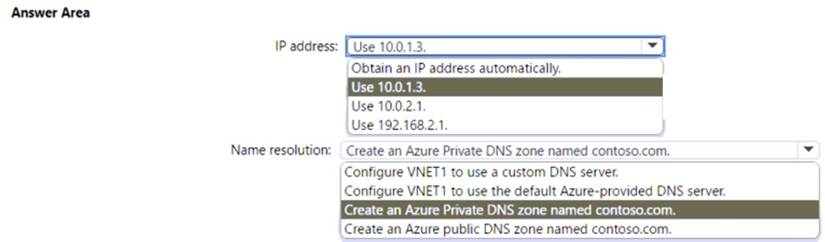
Solution:
✑ IP address: You should use 10.0.1.3 as the IP address for DC1. This is because DC1 needs to have a static IP address within the subnet range of VNET1, which is 10.0.1.0/241. You cannot use 10.0.2.1 or 192.168.2.1, as they are outside of the subnet range of VNET1. You also cannot obtain an IP address automatically, as this may cause DC1 to lose its IP address and break the DNS resolution for the domain members2.
✑ Name Resolution: You should configure VNET1 to use a custom DNS server that
points to the IP address of DC1, which is 10.0.1.33. This is because DC1 is the domain controller and DNS server for contoso.com, and it needs to resolve the AD DS DNS names for the domain members that are in Azure or on-premises. You cannot use the default Azure-provided DNS server, as it does not support AD DS DNS names. You also do not need to create an Azure Private DNS zone or an Azure public DNS zone named contoso.com, as these are not required for AD DS DNS resolution.
Does this meet the goal?
- A. Yes
- B. Not Mastered
Answer: A
NEW QUESTION 15
You have five Azure virtual machines that run Windows Server 2016. The virtual machines are configured as web servers.
You have an Azure load balancer named LB1 that provides load balancing services for the virtual machines.You need to ensure that visitors are serviced by the same web server for each request. What should you configure?
- A. Floating IP (direct server return) to Enabled
- B. Idle Time-out (minutes) to 20
- C. Protocol to UDP
- D. Session persistence to Client IP and Protocol
Answer: D
Explanation:
https://learn.microsoft.com/en-us/azure/load-balancer/distribution-mode-concepts
Session persistence: Client IP and protocol - Traffic from the same client IP and protocol is routed to the same backend instance
NEW QUESTION 16
You have an Azure subscription that contains an Azure SQL database named DB1.You plan to use Azure Monitor to monitor the performance of DB1. You must be able to run queries to analyze log data.
Which destination should you configure in the Diagnostic settings of DB 1?
- A. Send to a Log Analytics workspace.
- B. Archive to a storage account.
- C. Stream to an Azure event hub.
Answer: A
Explanation:
✑ According to the Microsoft documentation, Azure Monitor collects and analyzes monitoring data from Azure resources, including Azure SQL databases. You can use Azure Monitor to monitor the performance of DB1 and run queries to analyze log data.
✑ To use Azure Monitor, you need to configure the diagnostic settings of DB1, which define the sources and destinations of the monitoring data. The sources are the types of metric and log data to send to the destinations, such as SQLInsights, Errors, Blocks, Deadlocks, etc. The destinations are one or more locations where you want to send the monitoring data, such as a Log Analytics workspace, a storage account, or an event hub.
✑ A Log Analytics workspace is a unique environment for Azure Monitor log data.
Each workspace has its own data repository and configuration, and data sources and solutions are configured to store their data in a particular workspace. You can use a Log Analytics workspace to run queries on the log data collected from DB1 and other resources using the Kusto query language. You can also create alerts, dashboards, and workbooks based on the log data in the workspace.
✑ A storage account is a place where you can store large amounts of unstructured
data, such as files, blobs, queues, tables, and disks. You can use a storage account to archive the monitoring data from DB1 for long-term retention or backup purposes. However, you cannot run queries on the log data in a storage account directly. You would need to use another tool or service to analyze the log data in a storage account.
✑ An event hub is a service that enables you to ingest and process large volumes of
streaming data from multiple sources. You can use an event hub to stream the monitoring data from DB1 to other applications or services that can consume and analyze the data in real time. However, you cannot run queries on the log data in an event hub directly. You would need to use another tool or service to analyze the log data in an event hub.
NEW QUESTION 17
HOTSPOT
You need to generate a shared access signature (SAS). The solution must meet the following requirements:
• Ensure that the SAS can only be used to enumerate and download blobs stored in container1.
• Use the principle of least privilege,
Which three settings should you enable? To answer, select the appropriate settings in the answer area.
NOTE: Each correct selection is worth one point.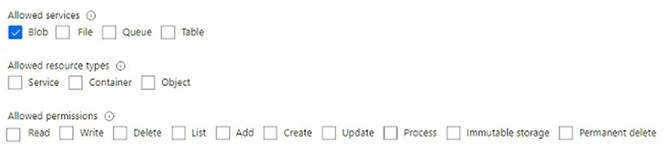
Solution:
To generate a shared access signature (SAS) that meets the requirements, you should enable the following three settings:
✑ Service: Blob
✑ Allowed resource types: Container
✑ Allowed permissions: Read and List
These settings will ensure that the SAS can only be used to enumerate and download blobs stored in container1, and not to perform any other operations on the storage account or the blobs. This follows the principle of least privilege, which means granting the minimum permissions necessary for a task.
You can use the Azure portal or Azure Storage Explorer to create a SAS token with these settings. For more information, see Create shared access signature (SAS) tokens for storage containers and blobs - Azure AI services | Microsoft Learn.
Does this meet the goal?
- A. Yes
- B. Not Mastered
Answer: A
NEW QUESTION 18
......
Thanks for reading the newest AZ-104 exam dumps! We recommend you to try the PREMIUM Thedumpscentre.com AZ-104 dumps in VCE and PDF here: https://www.thedumpscentre.com/AZ-104-dumps/ (232 Q&As Dumps)