It is impossible to pass Fortinet NSE5_FMG-6.4 exam without any help in the short term. Come to Exambible soon and find the most advanced, correct and guaranteed Fortinet NSE5_FMG-6.4 practice questions. You will get a surprising result by our Down to date Fortinet NSE 5 - FortiManager 6.4 practice guides.
Check NSE5_FMG-6.4 free dumps before getting the full version:
NEW QUESTION 1
View the following exhibit.
What is the purpose of setting ADOM Mode to Advanced?
- A. The setting allows automatic updates to the policy package configuration for a managed device
- B. The setting enables the ADOMs feature on FortiManager
- C. This setting allows you to assign different VDOMs from the same FortiGate to different ADOMs.
- D. The setting disables concurrent ADOM access and adds ADOM locking
Answer: C
Explanation:
Reference:
https://docs.fortinet.com/document/fortianalyzer/7.0.0/administration-guide/66530/adom-device-modes
NEW QUESTION 2
Refer to the exhibit.
Which two statements about an ADOM set in Normal mode on FortiManager are true? (Choose two.)
- A. It supports the FortiManager script feature
- B. It allows making configuration changes for managed devices on FortiManager panes
- C. FortiManager automatically installs the configuration difference in revisions on the managed FortiGate
- D. You cannot assign the same ADOM to multiple administrators
Answer: AB
Explanation:
"FortiGate units in the ADOM will query their own configuration every 5 seconds. If there has been a configuration change, the FortiGate unit will send a diff revision on the change to the FortiManager using the FGFM protocol."
NEW QUESTION 3
An administrator would like to create an SD-WAN using central management in the Training ADOM. To create an SD-WAN using central management, which two steps must be completed? (Choose two.)
- A. Specify a gateway address when you create a default SD-WAN static route
- B. Enable SD-WAN central management in the Training ADOM
- C. Configure and install the SD-WAN firewall policy and SD-WAN static route before installing the SD-WANtemplate settings
- D. Remove all the interface references such as routes or policies that will be a part of SD-WAN member interfaces
Answer: BD
Explanation:
Reference:
https://docs.fortinet.com/document/fortigate/6.0.0/cookbook/676493/removing-existing-configuration-reference
NEW QUESTION 4
An administrator has assigned a global policy package to custom ADOM1. Then the administrator creates a new policy package, Fortinet, in the custom ADOM1.
Which statement about the global policy package assignment to the newly-created policy package Fortinet is true?
- A. When a new policy package is created, it automatically assigns the global policies to the new package.
- B. When a new policy package is created, you need to assign the global policy package from the global ADOM.
- C. When a new policy package is created, you need to reapply the global policy package to the ADOM.
- D. When a new policy package is created, you can select the option to assign the global policies to the new package.
Answer: A
Explanation:
Global Policy Package is applied at the ADOM level and you have the option to choose which ADOM policy packages you want to exclude (there is no option to choose Policy Packages to include).
NEW QUESTION 5
What does a policy package status of Modified indicate?
- A. FortiManager is unable to determine the policy package status
- B. The policy package was never imported after a device was registered on FortiManager
- C. The Policy configuration has been changed on a managed device and changes have not yet been imported into FortiManager
- D. The Policy package configuration has been changed on FortiManager and changes have not yet been installed on the managed device.
Answer: D
Explanation:
Reference:
http://help.fortinet.com/fmgr/50hlp/56/5-6-1/FortiManager_Admin_Guide/1200_Policy%20and%20Objects/080
NEW QUESTION 6
An administrator wants to delete an address object that is currently referenced in a firewall policy. What can the administrator expect to happen?
- A. FortiManager will not allow the administrator to delete a referenced address object
- B. FortiManager will disable the status of the referenced firewall policy
- C. FortiManager will replace the deleted address object with the none address object in the referencedfirewall policy
- D. FortiManager will replace the deleted address object with all address object in the referenced firewall policy
Answer: C
Explanation:
Reference:
https://help.fortinet.com/fmgr/50hlp/56/5-6-2/FortiManager_Admin_Guide/1200_Policy%20and%20Objects/12
NEW QUESTION 7
Which two statements about Security Fabric integration with FortiManager are true? (Choose two.)
- A. The Security Fabric license, group name and password are required for the FortiManager Security Fabric integration
- B. The Fabric View module enables you to generate the Security Fabric ratings for Security Fabric devices
- C. The Security Fabric settings are part of the device level settings
- D. The Fabric View module enables you to view the Security Fabric ratings for Security Fabric devices
Answer: CD
NEW QUESTION 8
View the following exhibit: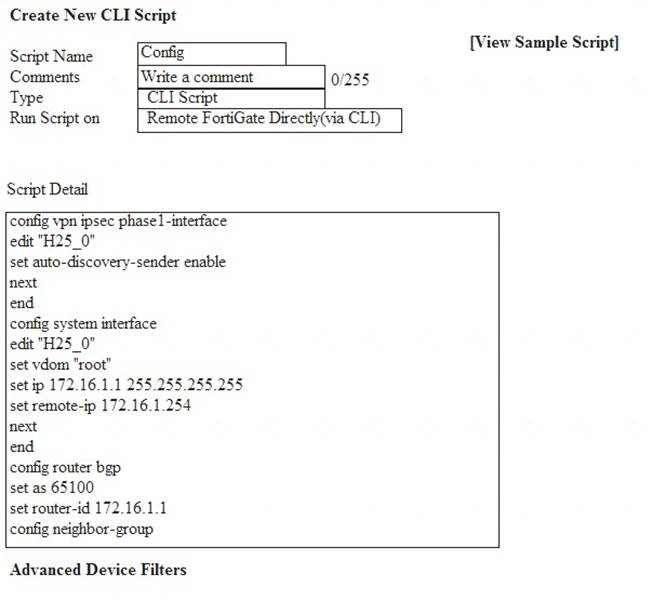
Which two statements are true if the script is executed using the Remote FortiGate Directly (via CLI)
option? (Choose two.)
- A. You must install these changes using Install Wizard
- B. FortiGate will auto-update the FortiManager’s device-level database.
- C. FortiManager will create a new revision history.
- D. FortiManager provides a preview of CLI commands before executing this script on a managed FortiGate.
Answer: BC
NEW QUESTION 9
View the following exhibit:
How will FortiManager try to get updates for antivirus and IPS?
- A. From the list of configured override servers with ability to fall back to public FDN servers
- B. From the configured override server list only
- C. From the default server fdsl.fortinet.com
- D. From public FDNI server with highest index number only
Answer: A
Explanation:
Reference:
https://community.fortinet.com/t5/Fortinet-Forum/Clarification-of-FortiManager-s-quot-Server-Override-Mode
NEW QUESTION 10
An administrator is replacing a device on FortiManager by running the following command: execute device replace sn <devname> <serialnum>.
What device name and serial number must the administrator use?
- A. Device name and serial number of the original device.
- B. Device name and serial number of the replacement device.
- C. Device name of the replacement device and serial number of the original device.
- D. Device name of the original device and serial number of the replacement device.
Answer: D
NEW QUESTION 11
Which two settings must be configured for SD-WAN Central Management? (Choose two.)
- A. SD-WAN must be enabled on per-ADOM basis
- B. You can create multiple SD-WAN interfaces per VDOM
- C. When you configure an SD-WAN, you must specify at least two member interfaces.
- D. The first step in creating an SD-WAN using FortiManager is to create two SD-WAN firewall policies.
Answer: AC
NEW QUESTION 12
An administrator, Trainer, who is assigned the Super_User profile, is trying to approve a workflow session that was submitted by another administrator, Student. However, Trainer is unable to approve the workflow session.
What can prevent an admin account that has Super_User rights over the device from approving a workflow session?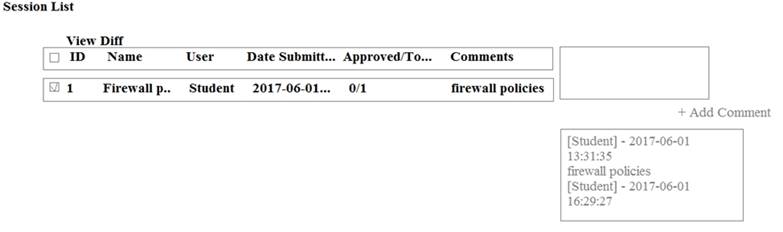
- A. Trainer is not a part of workflow approval group
- B. Trainer does not have full rights over this ADOM
- C. Trainer must close Student’s workflow session before approving the request
- D. Student, who submitted the workflow session, must first self-approve the request
Answer: A
Explanation:
Reference:
https://help.fortinet.com/fmgr/50hlp/56/5-6-1/FMG-FAZ/0800_ADOMs/1800_Workflow/0600_Workflow%20s
NEW QUESTION 13
Refer to the exhibit.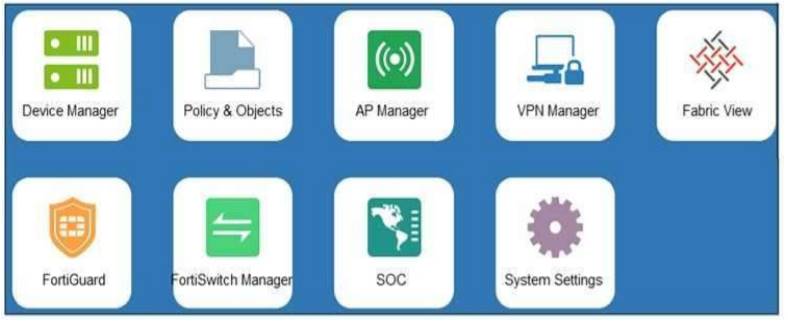
An administrator logs into the FortiManager GUI and sees the panes shown in the exhibit.
Which two reasons can explain why the FortiAnalyzer feature panes do not appear? (Choose two.)
- A. The administrator logged in using the unsecure protocol HTTP, so the view is restricted.
- B. The administrator profile does not have full access privileges like the Super_User profile.
- C. The administrator IP address is not a part of the trusted hosts configured on FortiManager interfaces.
- D. FortiAnalyzer features are not enabled on FortiManager.
Answer: BD
NEW QUESTION 14
An administrator with the Super_User profile is unable to log in to FortiManager because of an authentication failure message.
Which troubleshooting step should you take to resolve the issue?
- A. Make sure FortiManager Access is enabled in the administrator profile
- B. Make sure Offline Mode is disabled
- C. Make sure the administrator IP address is part of the trusted hosts.
- D. Make sure ADOMs are enabled and the administrator has access to the Global ADOM
Answer: C
Explanation:
Even if a user entered the correct userid/password, the FMG denies access if a user is logging in from an untrusted source IP subnets.
Reference: https://docs.fortinet.com/document/fortimanager/6.0.3/administration-guide/107347/trusted-hosts
NEW QUESTION 15
What will be the result of reverting to a previous revision version in the revision history?
- A. It will install configuration changes to managed device automatically
- B. It will tag the device settings status as Auto-Update
- C. It will generate a new version ID and remove all other revision history versions
- D. It will modify the device-level database
Answer: D
NEW QUESTION 16
In the event that the primary FortiManager fails, which of the following actions must be performed to return the FortiManager HA to a working state?
- A. Secondary device with highest priority will automatically be promoted to the primary role, and manually reconfigure all other secondary devices to point to the new primary device
- B. Reboot one of the secondary devices to promote it automatically to the primary role, and reconfigure all other secondary devices to point to the new primary device.
- C. Manually promote one of the secondary devices to the primary role, and reconfigure all other secondarydevices to point to the new primary device.
- D. FortiManager HA state transition is transparent to administrators and does not require any reconfiguration.
Answer: C
Explanation:
FortiManager_6.4_Study_Guide-Online – page 346
FortiManager HA doesn’t support IP takeover where an HA state transition is transparent to administrators. If a failure of the primary occurs, the administrator must take corrective action to resolve the problem that may include invoking the state transition. If the primary device fails, the administrator must do the following in order to return the FortiManager HA to a working state:
* 1. Manually reconfigure one of the secondary devices to become the primary device
* 2. Reconfigure all other secondary devices to point to the new primary device
NEW QUESTION 17
......
Recommend!! Get the Full NSE5_FMG-6.4 dumps in VCE and PDF From Dumps-files.com, Welcome to Download: https://www.dumps-files.com/files/NSE5_FMG-6.4/ (New 59 Q&As Version)